
OnlyFans promotional pricing lets subscribers pay less than the platform’s standard minimum for one billing cycle, and the rules behind that discount are stricter than most people assume. This article walks through how a first-month rate under $4.99 becomes possible, how billing transitions when the promotion ends, and what to confirm before paying. It also explains how BestOnlyFans ranking cards separate a temporary promotional rate from the standard price a page reverts to. BestOnlyFans refreshes its rankings every month.

OnlyFans Base Price Floors and Promotional Exceptions
Creators cannot set a base rate below $4.99, and that rule applies to every paid page regardless of niche or follower count. The promotional first-month rate is the exception.
How the First-Month Discount Works
A creator can offer the first month below $4.99, commonly around $3, because the offer applies only to the initial billing period rather than the ongoing subscription. Promotional flexibility exists only at the first-month level, so any number below that floor is temporary by definition.
| Price Type | Minimum Allowed | Billing Continuity |
|---|---|---|
| Standard base subscription | $4.99 | Continues at the set rate until the subscriber cancels |
| First-month promotional | Below $4.99 possible | Transitions to the standard rate automatically |
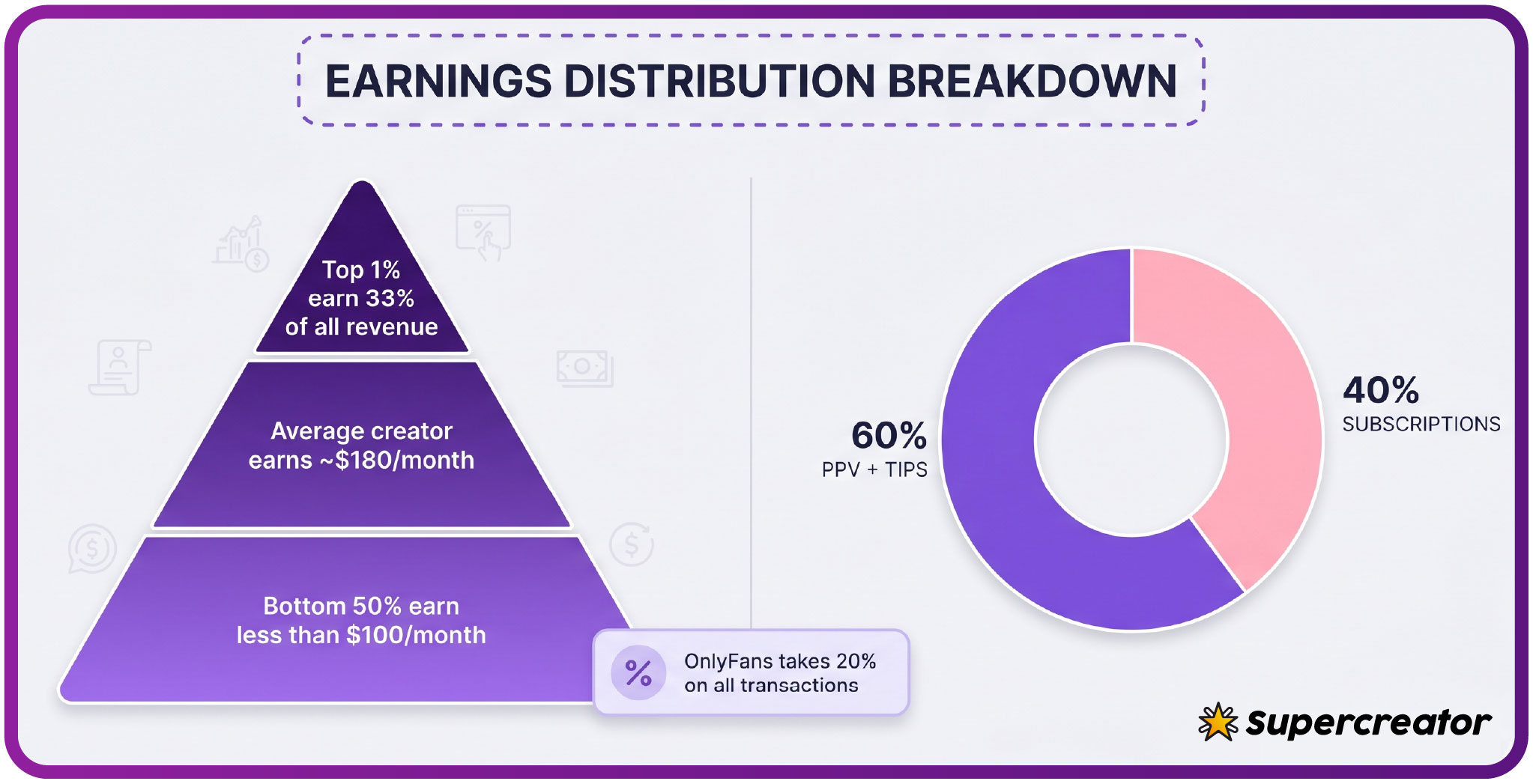
Free pages sit outside this structure entirely. A free page is set to $0, and the creator earns through pay-per-view messages and tips instead of a recurring fee. The platform takes a 20% fee on everything, so the creator keeps 80% of each subscription, PPV unlock, and tip. That split applies equally to a $3 promotional month and a $49.99 standard subscription.

How Promotional Pricing Displays on Creator Pages
The original price is typically shown with a strikethrough, with the discounted first-month rate displayed beside it. Savings are sometimes expressed as a percentage or a dollar amount.
- Original price shown with a strikethrough next to the promotional rate.
- Percentage or dollar savings displayed near the subscribe button.
- “Limited time” language or a countdown indicating the offer window.
- Subscription term clarity, showing that the discount applies to the first month only.
These visual cues matter because the discounted number is often the most prominent figure on the page. The standard rate the subscription reverts to is disclosed, but it usually appears in smaller text.
Tip: before subscribing at a promotional rate, locate the standard price the page will charge in month two. If you cannot find it on the page, treat the offer as unclear and verify before paying.
OnlyFans places a $0.10 verification hold on the card, which is refunded within days after the bank confirms the card is valid. That small hold is separate from the subscription charge itself and does not reduce the first-month rate.
Where the Discounted Number Appears
The promotional rate usually shows on the profile header, the subscribe button, and the checkout summary. If those three places disagree, the checkout total is the one that matters.

Billing Transition Mechanics After Promotional Periods
When a promotional period ends, the subscription does not expire. It converts to the creator’s standard rate automatically, and the next billing cycle charges the full base price.
- The promotional period reaches its defined end date, usually one month after the initial charge.
- The subscription rate adjusts automatically to the creator’s standard base price.
- The next charge is calculated at the full standard rate, not the promotional one.
- Notification timing varies, so the charge may post before any reminder reaches the subscriber.
When a base price increases, auto-renew stops for existing subscribers at the old rate, and access continues only until the paid period they already bought runs out.
Why the Second Charge Looks Different
The second charge reflects the real cost of the subscription. A page with a $3 first month and a $9.99 standard rate bills $9.99 in month two, and that pattern repeats until cancellation.
There is no separate “promotional subscription” product. The discount applies to the first billing period of an otherwise standard subscription, which is why the mechanics stay identical after the transition. That single fact resolves most confusion about the price jump.

Auto-Renewal Behavior During Promotional Transitions
Auto-renewal must be switched on for a promotional rate to apply, because the discount is delivered through the recurring subscription mechanism rather than a one-time purchase.
- Auto-renewal must be active to access the promotional rate at checkout.
- Renewal continues at the standard price once the promotion ends.
- No automatic cancellation is triggered by the promo-to-base rate increase.
This is where subscriber expectations and platform behavior diverge most. Many assume the subscription will lapse if they do not reconfirm at the higher price, but the default is continuation. Subscribers who want to stop before the standard rate hits must cancel manually before the renewal date.
Checking Your Renewal Status
Renewal status is visible in account settings alongside the next charge date. Reviewing it after any promotional subscription confirms whether the standard rate will bill automatically. Check it again a few days before the transition date, since that is when a surprise charge would otherwise post.

Reading Ranking Cards for Promotional Clarity
Ranking sites exist because OnlyFans has no built-in discovery feed or directory. Subscribers cannot browse a searchable catalog inside the platform, so third-party listings fill that gap.
How BestOnlyFans Structures Its Data
the ranking site applies a consistent methodology when it builds ranking cards: each entry is checked for the current displayed price, the standard rate the page reverts to, and a timestamp showing when that pricing data was last verified. The timestamp matters because promotions expire quickly and a stale card can show a discount that no longer exists.
A well-built card separates the two numbers rather than blending them. Look for the promotional rate, the standard rate, and the verification date as three distinct pieces of information.
This distinction also helps when comparing pages. A directory that tracks promotional windows accurately can point you toward the best onlyfans exclusive offers without mistaking a temporary discount for a permanent price. Prices across paid pages typically fall between $4.99 and $15, with most clustering around $5 to $10.
Subscriber Verification Steps Before Promotional Subscriptions
Verification takes a few minutes and prevents the most common source of billing confusion. The goal is to know exactly what month two will cost before month one is charged.
- Locate the standard rate disclosure on the creator’s page and read the actual number.
- Confirm how long the promotional period lasts, usually one month from the first charge.
- Identify whether auto-renewal is on by default at checkout.
- Set a calendar reminder for the rate change date so you can cancel in time if needed.
PPV messages unlock up to $50, paid chat commonly runs $3 to $5 per message, and tips can reach $100. These amounts sit outside the subscription and are not affected by promotional pricing. A discounted first month does not reduce PPV or chat costs.
Warning: a promotional rate never applies to PPV unlocks or paid messages. If your budget depends on the discount, separate the subscription cost from optional spending before you subscribe.
What to Check in Account Settings
Account settings show active subscriptions, renewal dates, and next charge amounts. Two-step authentication should also be enabled there to protect payment details.

Budget Planning Around Promotional Transitions
Sustainable budgeting means planning around the standard rate, not the promotional one. The discount is a single month, while the standard price is what recurs.
- Verify the exact second-month charge before subscribing.
- Project annual cost using the standard rate, not the promotional rate.
- Avoid stacking multiple promotional subscriptions you cannot sustain at full price.
- Mark the cancellation deadline for any subscription you do not intend to keep.
| Scenario | First Month | Subsequent Months |
|---|---|---|
| Pure promotional | $3-$4.98 | $4.99 or higher at the standard rate |
| No promotion | $4.99 or higher | Unchanged at the set base rate |
| Limited bundle | Prepaid multi-month | Locked rate until the bundle ends |
The prepaid term locks the rate for the bundle’s duration, and the standard price applies only after it expires. Tracking several promotional subscriptions at once is the most common budgeting mistake. Each one converts to its own standard rate on its own schedule, and the combined cost can exceed what a single full-price subscription would have been.
Cancelling before each transition, or confirming you intend to pay the standard rate, keeps spending deliberate rather than reactive. A simple written record of every renewal date removes the guesswork entirely.
FAQ
Can OnlyFans creators offer promotional pricing after I’ve already subscribed at their standard rate?
Promotional pricing generally applies to new subscriptions and first-month offers. An existing subscriber on a standard rate usually does not receive the promotional rate retroactively, though creators sometimes run limited offers that can apply when a subscription lapses and is renewed.
What happens if I cancel during a promotional period—do I keep the discounted rate until it ends?
Yes. Cancelling stops the next renewal, but access continues until the paid promotional period ends. You keep the discounted month you already paid for, and no charge at the standard rate follows.
How can I tell if a promotional price is still active when I view a creator’s page?
Check whether the strikethrough price, savings badge, or countdown is still displayed, and confirm the checkout total matches the promotional rate. If the checkout shows the standard price, the promotion has likely expired.
Why does my second OnlyFans month cost more than my first, even though the creator’s page shows one price?
The page displays the promotional first-month rate prominently, while the standard rate it reverts to is disclosed separately. The second charge bills at that standard rate, which is why the amount increases.